Properties
People
Potential
Built for
Owners. Agents.
Property Managers.
More
Time for
What Matters.
NEW VERSION 2.6 — VERIFIED LOCAL PROS, LEARNING CENTER & ONLINE RENT

Rental
Management
Made Simple.

Properties, tenants, payments, expenses, documents, reports and more — all in one place. Tenants pay online, verified local pros answer your jobs, and the Learning center explains Florida's rules in plain words. Less work today, better returns tomorrow.

Free 30-day trial for testing — your own private sandbox with realistic sample data. No credit card, nothing shared.
The Bar Rental team, holding the keys
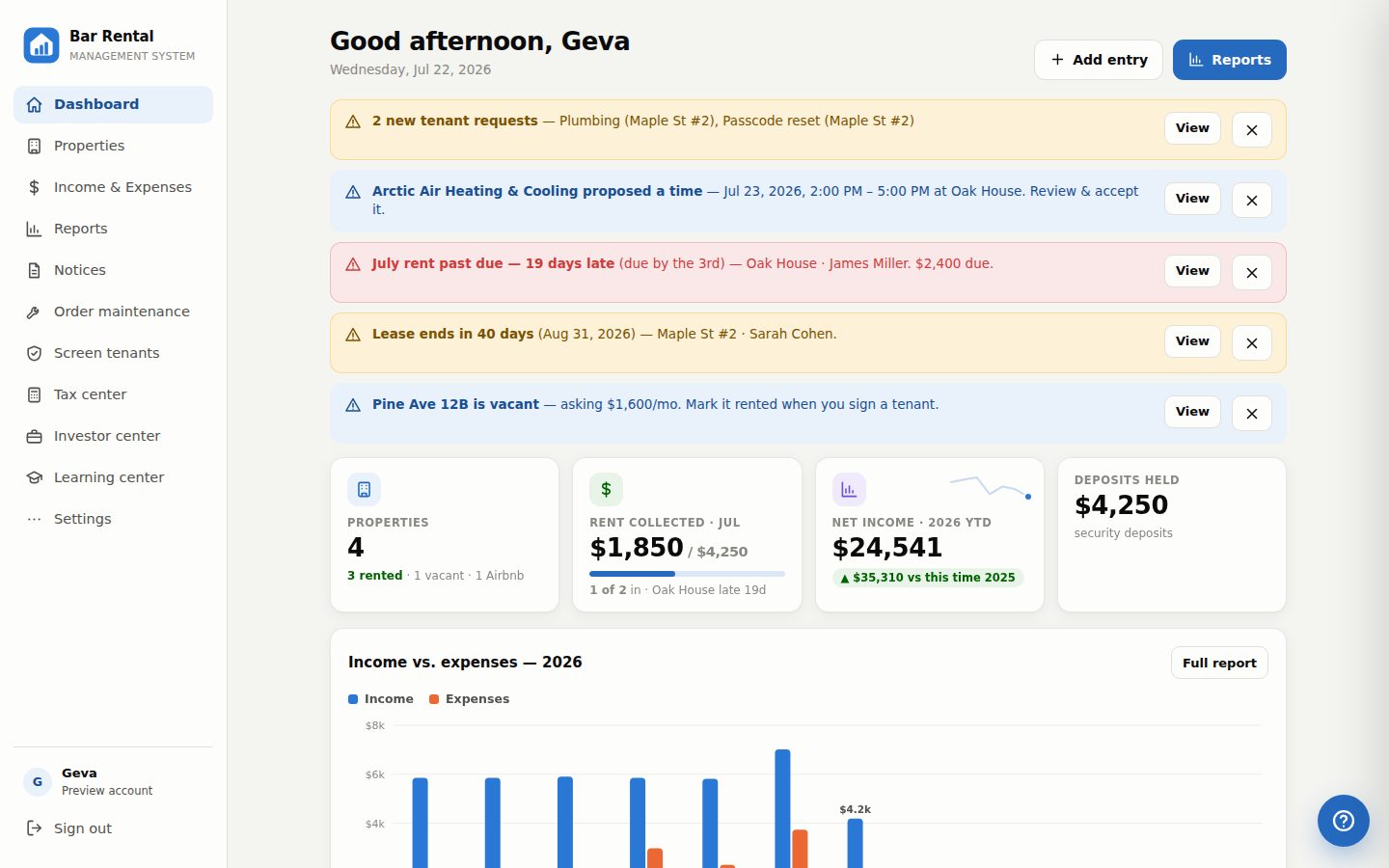
Bar Rental Management System dashboard
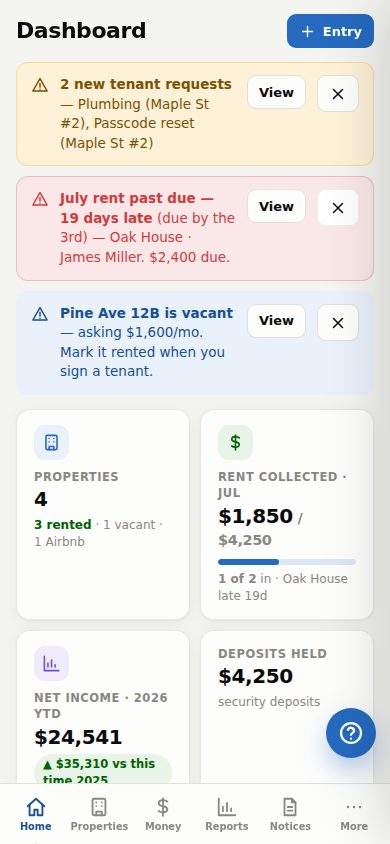
Dashboard on a phone
Manage
Properties
All your properties organized in one place.
Happy
Tenants
Keep tenants happy and informed.
Maximize
Returns
Track income, expenses and increase profits.
Real-Time
Insights
See what matters with live dashboards.
Smart
Alerts
Never miss a payment, renewal or request.
Cloud Based
Access Anywhere
Safe & Secure
Backed by Verified Local Pros
Every propertylong-term & short-term
Every dollarrent, bookings, expenses & late fees
Every documentdrag-and-drop invoices & leases
Every devicecomputer, tablet & phone
2.6NEW

Version 2.6 is here

Tenants pay rent online right in their portal — one tap, or full autopay that charges itself on the due day. And now: verified local pros, vetted and placed for your property's zip code with their own portal to confirm times, plus a Learning center that teaches the system with short videos and explains Florida's rules in plain words. Same simple system, same two-minute learning curve.

Tenant portal

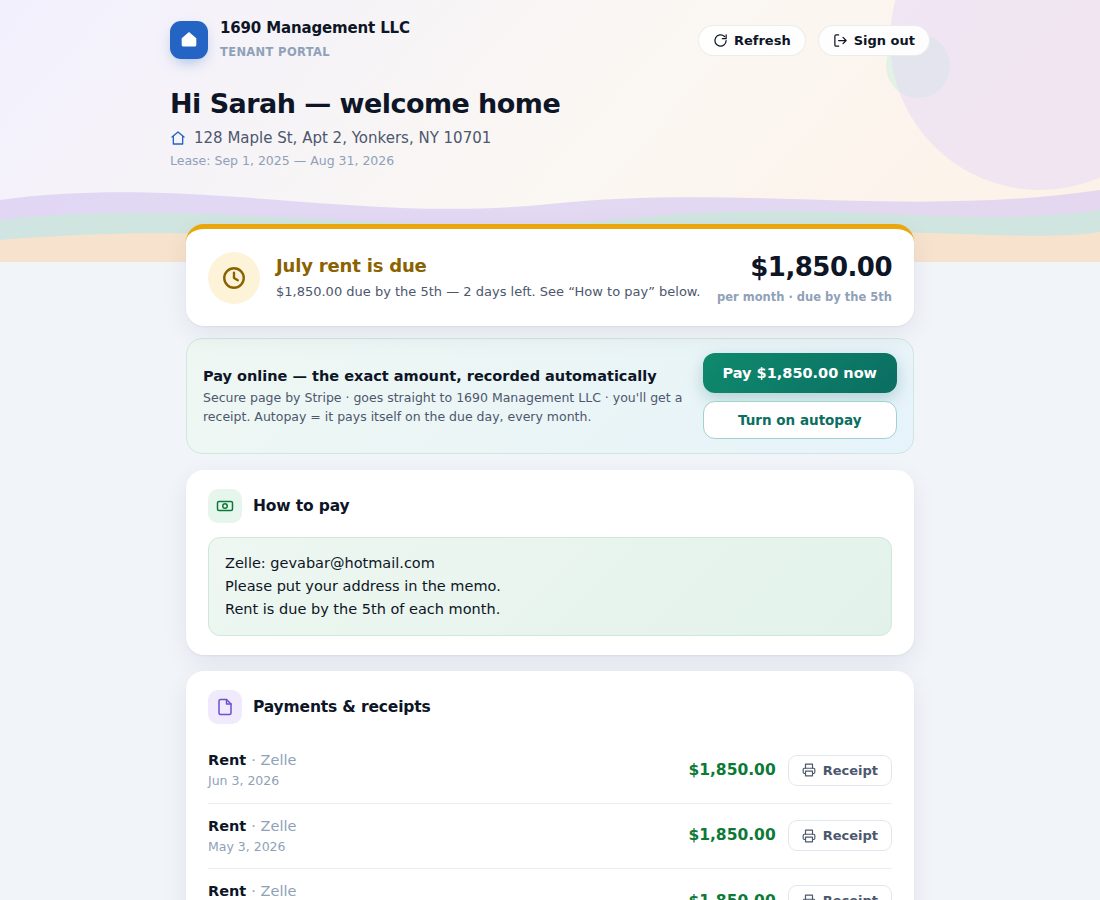
Every tenant gets their own passcode login: rent shown paid, due or late, Pay rent online and autopay buttons (always the exact amount, recorded automatically), printable receipts, the lease and documents you share, the deposit you hold, exactly how to pay — and repair requests with photos that land straight on your dashboard. They see only their home, never your books.

Tenant screening

Check applicants before you hand over keys: credit, criminal and eviction reports through TransUnion SmartMove. You pick the package, each adult applies from an email invite and pays their own fee, and the full report comes back to you — with every invitation recorded under the property.

Short-term management

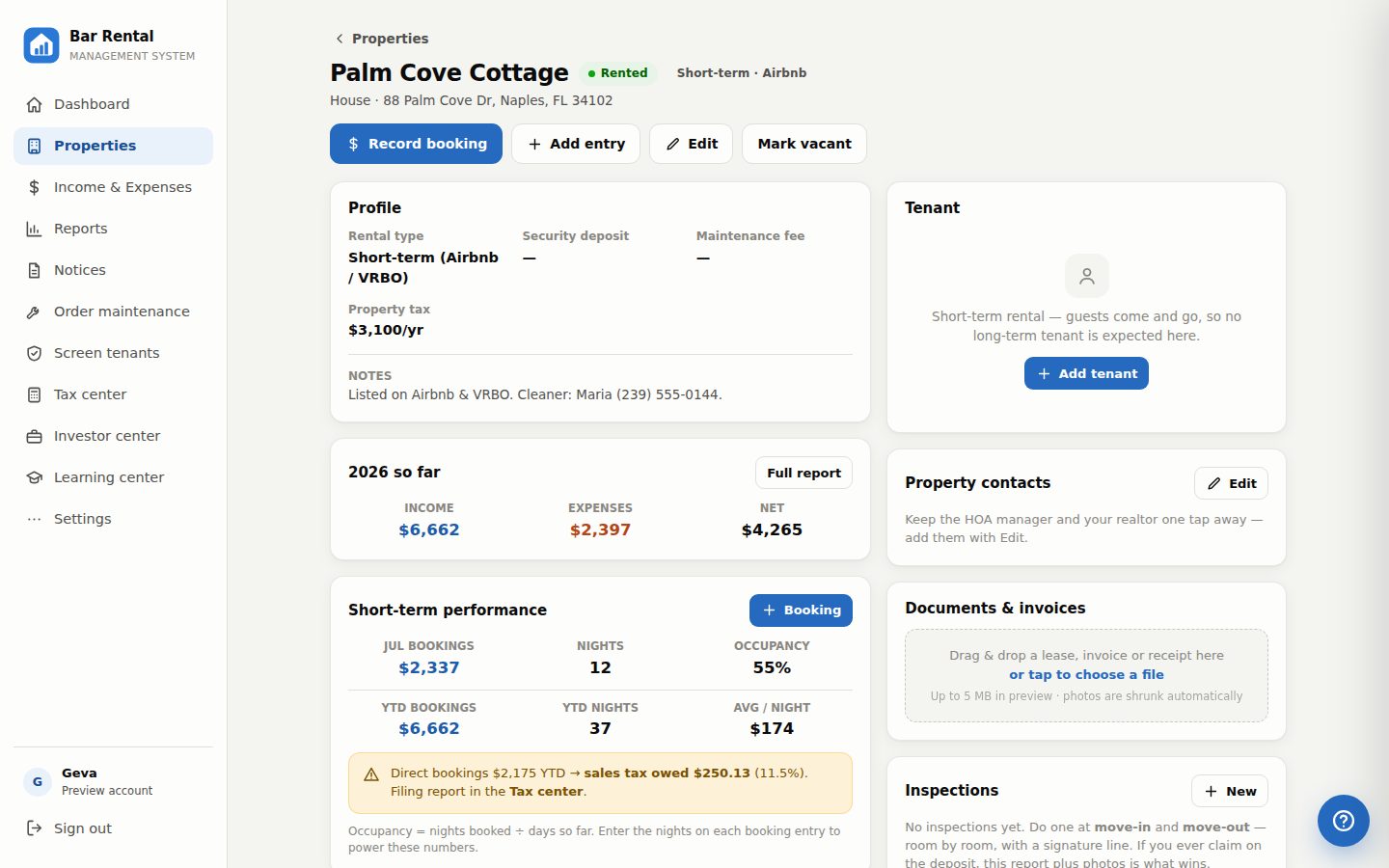
Flip any property to Airbnb / VRBO mode: log booking payouts with nights, watch occupancy and average-per-night, and track every booking's channel. Book direct — cash, Venmo, your own site? It totals the state sales tax you owe, month by month, ready to file.

Tax center

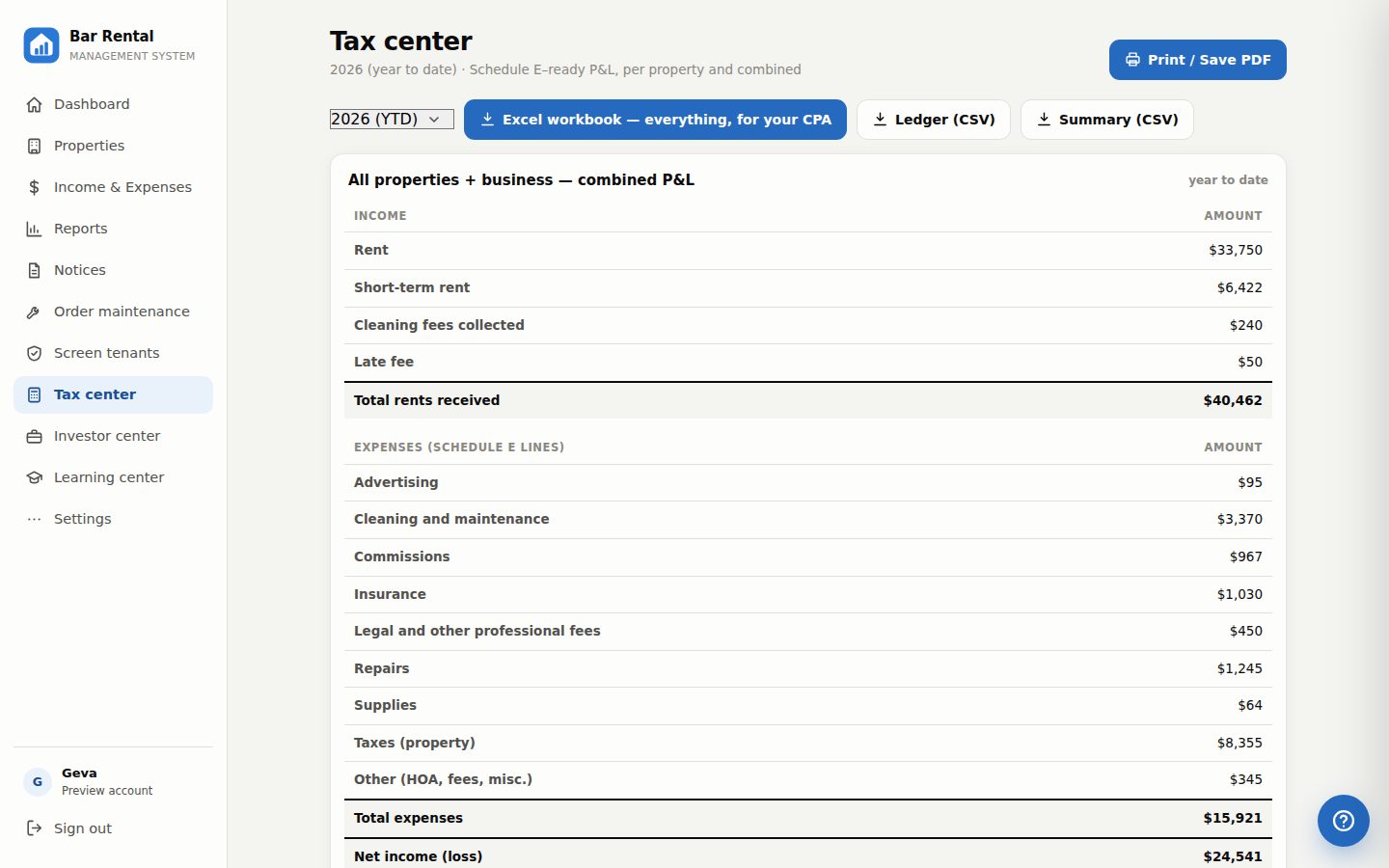
Every property's P&L on Schedule E lines, the combined portfolio, and the short-term sales-tax report — then one click builds a complete Excel workbook for your CPA: every P&L, the Schedule E grid, bookings & sales tax, and the full ledger, in one file.

JUST LANDED · 2.6 Verified local pros — vetted & placed for your property's zip code Vendor portal — pros confirm your time or propose another Order full unit turnover: cleaning, movers, GC, permits, flooring AC / Cooling joins the repair categories Learning center — Florida notices & eviction rules in plain words How-do-I videos, right inside the system Plus 2.4: rent paid online & autopay, recorded by itself
NEW ONLINE RENT & AUTOPAY

Tenants can now pay rent right in the system — or set autopay and forget it

One tap in their portal opens a secure payment page with the exact rent already locked in — tenants can never type their own amount. The money goes straight into your bank account, and the entry writes itself into your books the moment the money truly arrives.

  • Pay rent in one tap — a secure Stripe page, bank transfer or card, receipt included
  • Sign up for autopay once — rent charges itself on the lease's due day, every month
  • Recorded automatically — never before the money is real, never twice, never the wrong amount
  • Straight to your own bank — nothing monthly; bank-transfer fee capped at $5
Included with the tenant portal · you turn it on once in Settings (about 15 minutes) · tenants who prefer Zelle or checks still see your payment instructions

Everything a landlord juggles, in one place

Stop stitching together spreadsheets, notes apps and shoeboxes of receipts.

Property profiles

Address, rent, lease dates, security deposit, last month's rent held — plus maintenance fees and property tax counted into reports automatically, only for the months you owned it.

Rent that watches itself

Set each property's due day and late fee. Paid, due, or past-due shows everywhere — with one-tap late fees, prepaid-rent handling, and alerts you can dismiss.

Tenants & history

Contact details a tap away — call or email from the app. Move-outs are archived automatically, so past tenants and their dates are never lost.

Tenant portal

Give each tenant a passcode login of their own: rent status, a Pay-rent-online button, printable receipts, the lease you share, deposit held, how to pay — and repair requests with photos that land on your dashboard. You control it all; they never see your books.

Tenant screening

Credit, criminal and eviction reports through TransUnion SmartMove — you pick the package, the applicant pays and applies from an email invite, the report comes to you. Multiple applicants at once, every invite recorded.

Leases & invoices attached

Drag any lease, invoice or receipt onto a property. Files up to 50 MB, photos compressed automatically, everything stored in your private cloud.

Reports built for tax time

Month-by-month and year-to-date, per property or whole portfolio — including business-level costs like LLC and accounting fees. Print-ready in one click.

Notices, filled in for you

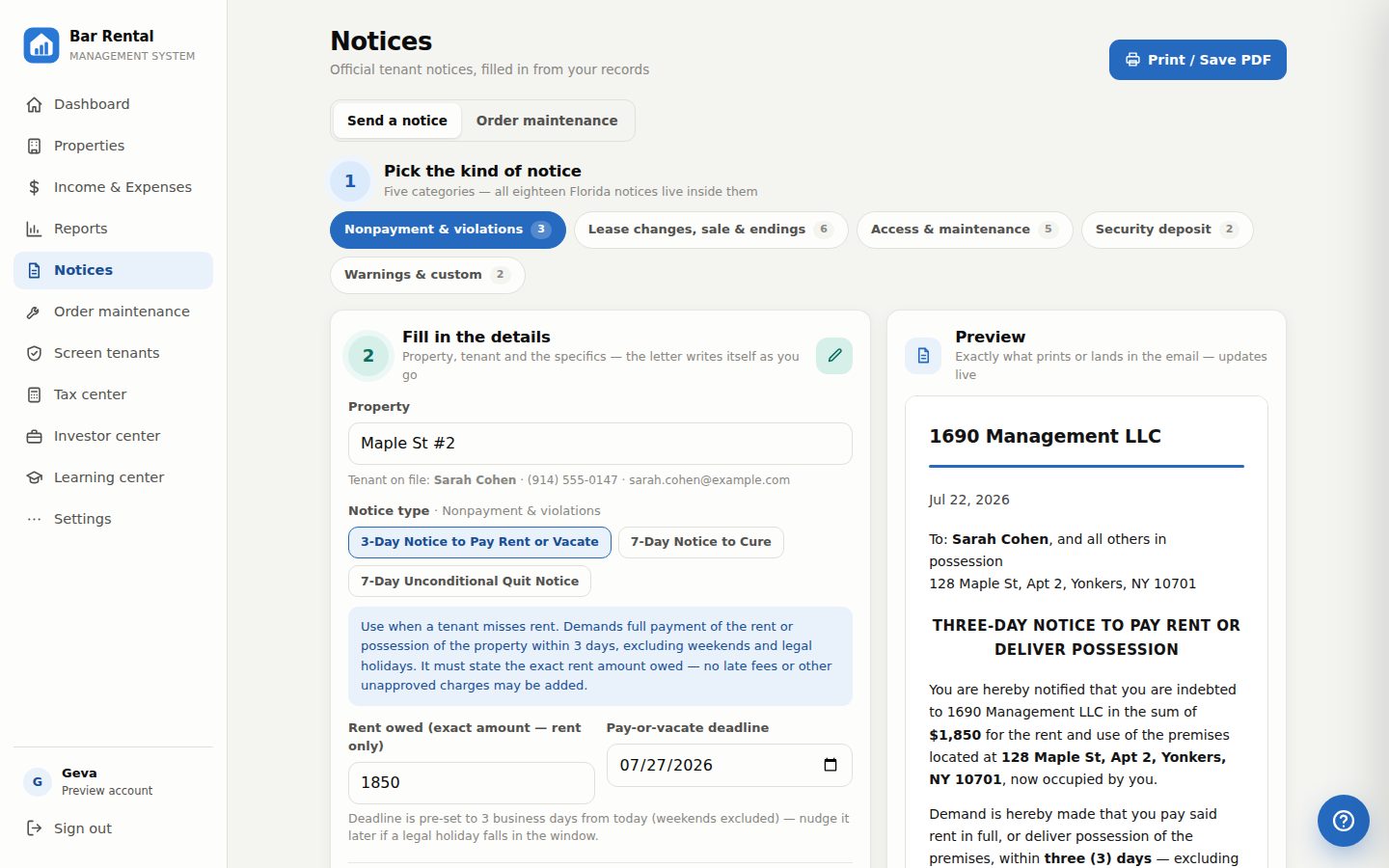
Eighteen notice templates in five tap-able categories — late rent, violations, rent increases, entry, security-deposit return & claim, noise complaints, even a write-your-own letter — auto-filled with the tenant, address and exact amounts, each with its rule explained. Every send is recorded under the property.

Short-term (Airbnb) mode

Switch any property to short-term: record booking payouts with nights, see occupancy and average-per-night, tag each booking Airbnb, VRBO or direct — and get a filing-ready report of the sales tax you owe on direct bookings.

Bank & Airbnb import

Drop in a CSV from your bank or your Airbnb earnings page and a whole month logs itself — dates, amounts and categories guessed for you, duplicates flagged, every row editable before it lands.

Move-in & move-out inspections

Room-by-room condition checklists with notes, printed as a signed report. Paired with the deposit-claim letters, it's the evidence that wins disputes.

Your team, your rules

Give your CPA a view-only login — browse and export everything, change nothing — or a manager full access, with a one-time invite code. Remove access in one tap.

Tax center

A Schedule E–ready P&L for every property and the combined portfolio, with maintenance fees and taxes placed on the right lines — plus one-click ledger and summary exports for your accountant.

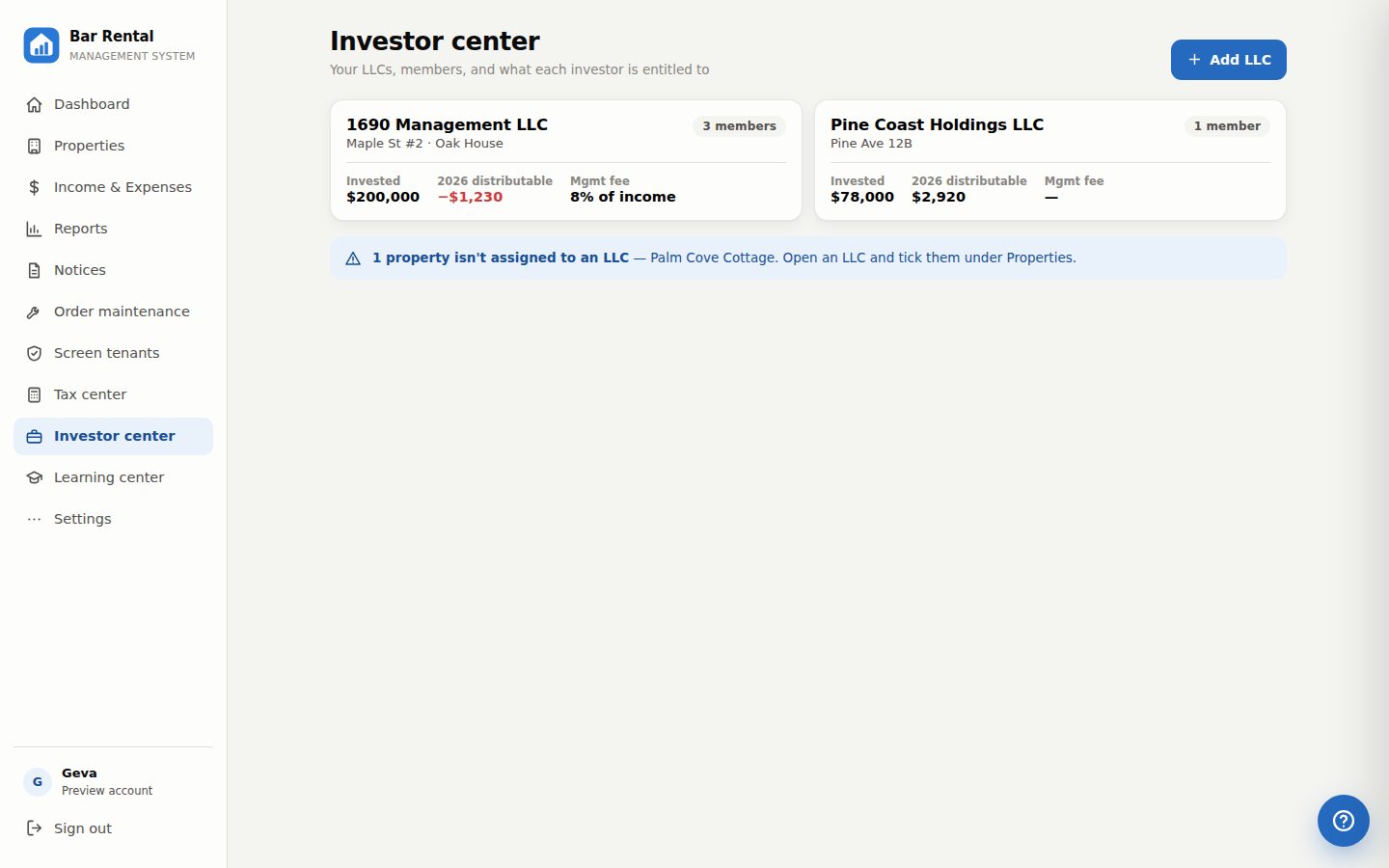
Investor center

Track your LLCs, members and ownership splits — then hand each investor a real statement: distributions, cap rate, cash-on-cash, ROI and IRR, realized the moment a property sells.

A quick look inside

Real screens from the system, running on sample data.

1DASHBOARD

Know where you stand in five seconds

A personal greeting, rent collected against what's expected, year-to-date net with a trend line and a vs-last-year comparison — and alerts that matter: tenant requests, past-due rent, leases ending soon.

  • Collection ring: who's paid, who's late, at a glance
  • One tap from a late rent to the finished late-rent letter
  • Airbnb pulse: occupancy, average per night, payouts
Dashboard with rent status and income chart
2PROPERTIES

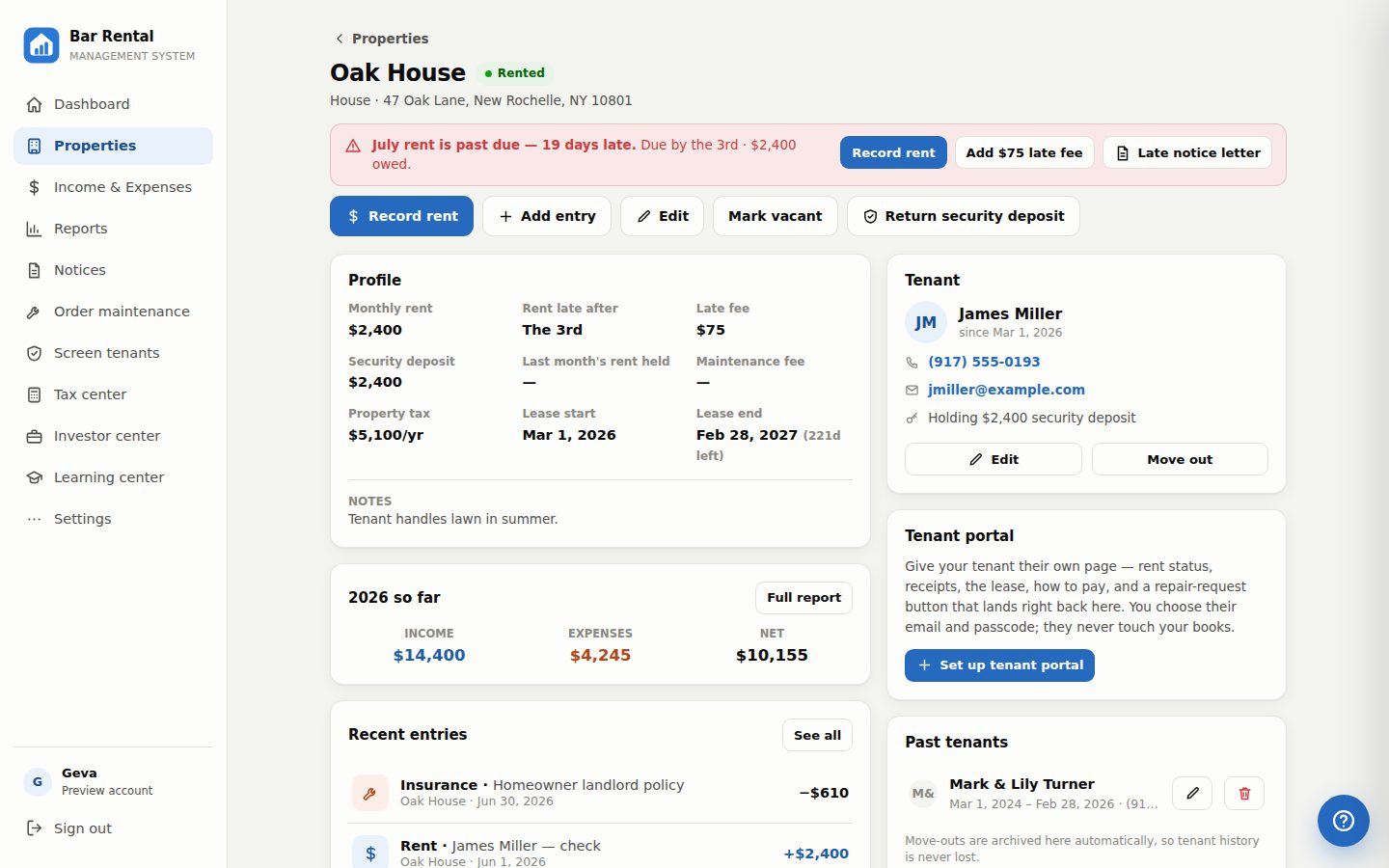
Each property, fully in view

Lease dates with days remaining, tenant contact card, documents box, and this year's numbers — with maintenance fees and taxes counted in automatically.

  • Record rent or a late fee in one tap
  • Past tenants archived forever
  • Deleted properties go to a recycle bin, not oblivion
Property page with tenant and documents
3TENANT PORTAL · PAY ONLINE & AUTOPAY

Your tenants get a portal they'll actually love

Hand each tenant an email + passcode and they see their own page: rent marked paid, due or late, a printable receipt for every payment, the lease you've shared, the deposit you hold, and exactly how to pay you.

  • New: Pay rent & one-tap autopay — always the exact amount, straight to your bank, recorded in your books automatically once the money arrives
  • Repair requests with photos land on your dashboard — mark them In progress or Done
  • Forgot passcode? You fix it in one tap. Preview their view anytime
The tenant portal with rent due, the Pay online button, receipts and how to pay
4MONEY

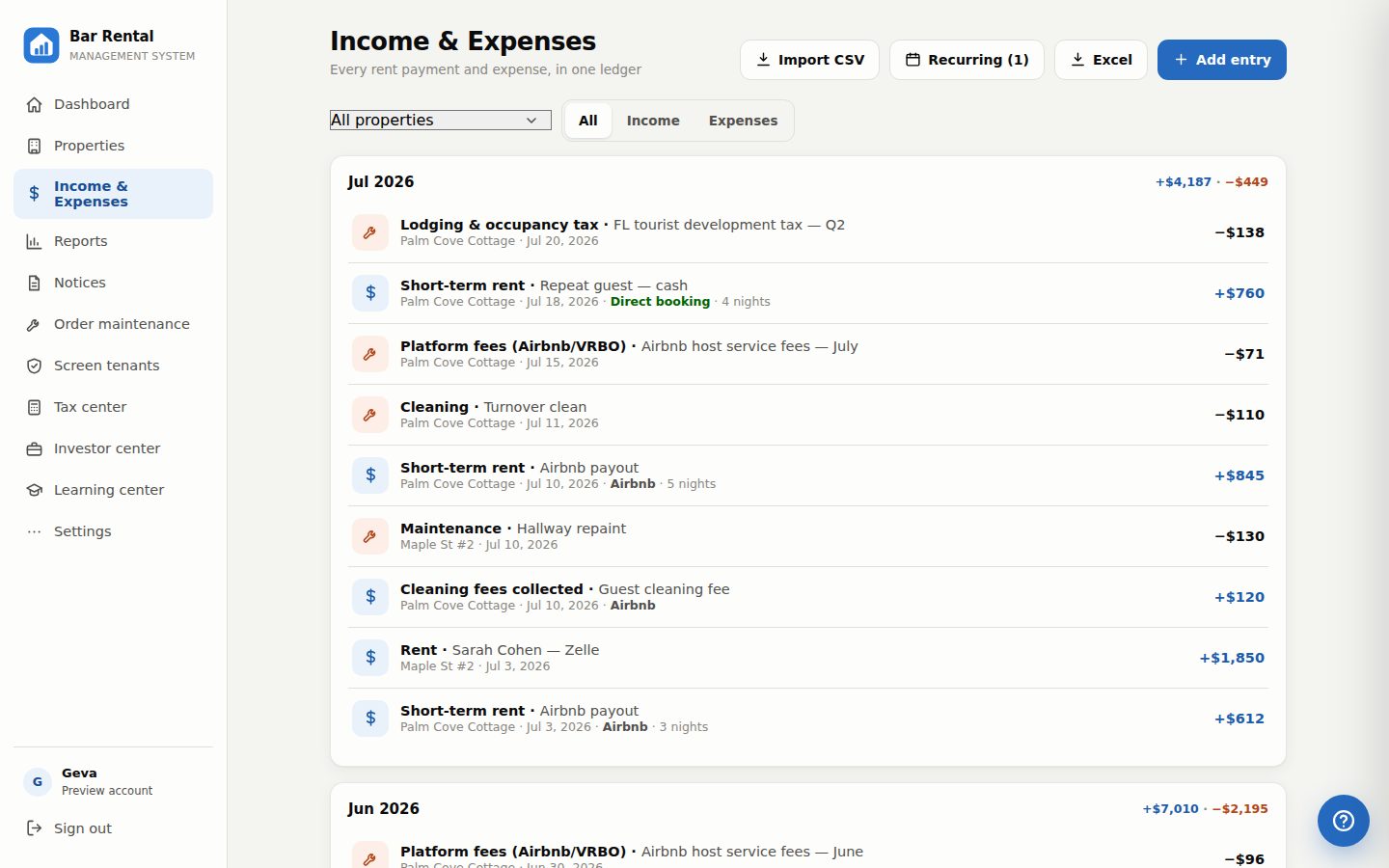
Every dollar, categorized

Log rent received and expenses as they happen — repairs, insurance, HOA, broker fees, LLC and accounting costs for the whole business.

  • Filter by property or business-level
  • Undo accidental deletes
  • Monthly ledgers with running totals
Income and expense ledger
5NEW IN 2.0 — SHORT-TERM

Run your Airbnb like a pro

Mark a property short-term and the whole system adapts: no rent-due alerts, a Record-booking button instead, and the numbers short-term hosts actually watch.

  • Bookings, nights, occupancy %, and average per night — this month and YTD
  • Tag every payout Airbnb, VRBO or direct (cash, Venmo, your own site)
  • Sales tax on direct bookings computed at your rate, with a month-by-month filing report
Short-term rental property page with occupancy and booking stats
6NEW IN 2.0 — NOTICES

Eighteen notices, one tap away

Category buttons across the top, every notice auto-filled from your records on your company letterhead, with the Florida rules explained beside each one.

  • Security-deposit return & claim letters with the exact statutory wording — pick claim items, amounts, or type your own
  • Noise-complaint letter and a write-your-own custom letter
  • Email or print in one tap — every send recorded under the property, with the date, as your proof
Notices screen with category buttons and a security deposit claim letter
7MAINTENANCE

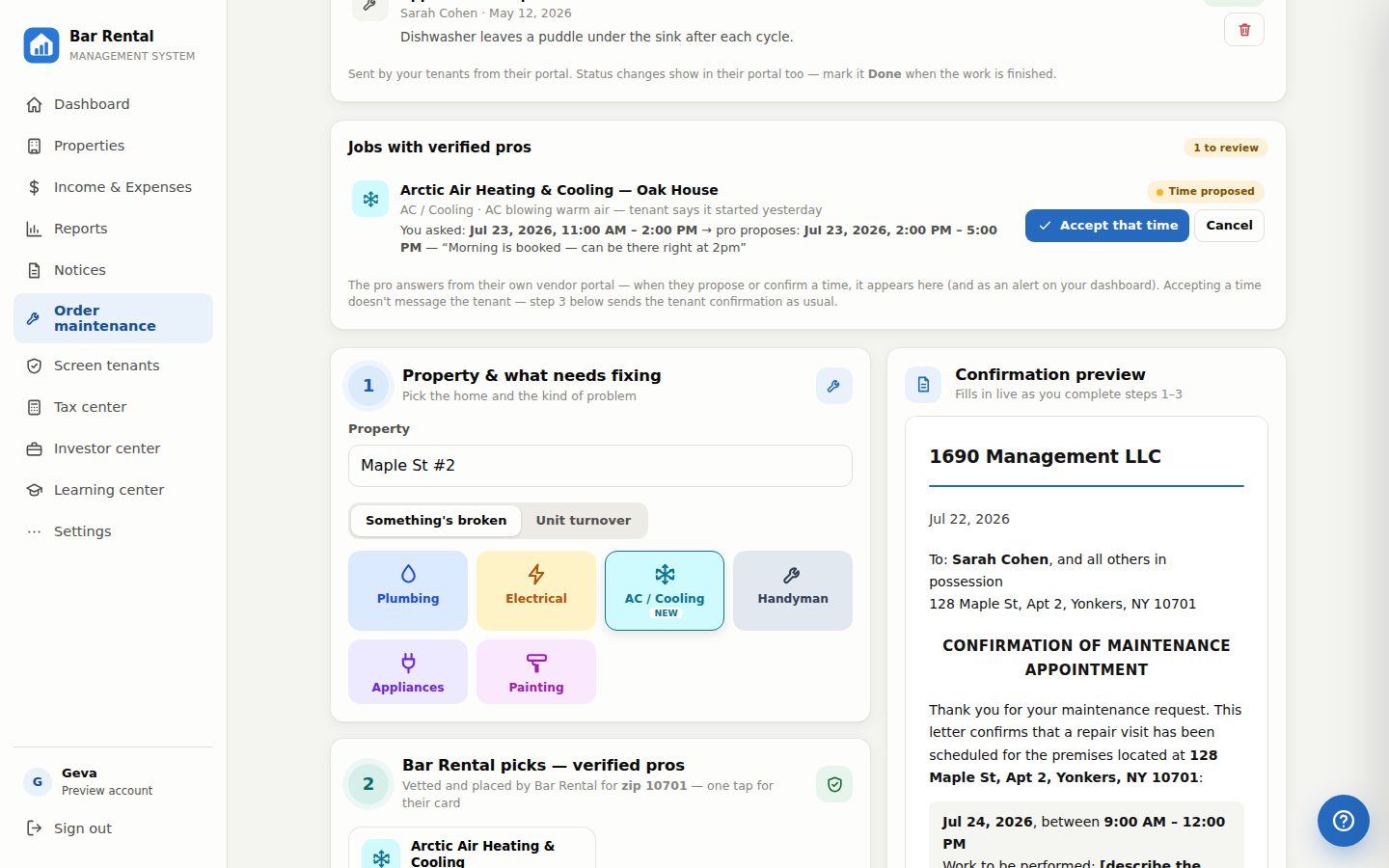
Scheduling maintenance, made easy

Something broke? Pick the trade, and the system opens the top-rated pros near that property — then helps you schedule the visit with your tenant and confirm it in writing.

  • Plumbing, electrical, handyman, painting or appliances
  • Top-reviewed pros near the property's zip code, one tap away
  • Tenant's number right there to call — confirmations by email and text, recorded automatically
Order maintenance screen with pro finder and tenant scheduling
8TAX CENTER

Tax season, already packaged

One page turns your year of records into the exact shape your accountant fills in — no shoebox, no spreadsheet weekend.

  • Individual P&L per property, plus the combined portfolio — on official Schedule E lines
  • Short-term bookings & sales-tax report, by channel and by filing month
  • One click builds a complete Excel workbook for your CPA — every P&L, the Schedule E grid, bookings & sales tax, and the full ledger — and every report in the system exports to Excel too
Tax center with Schedule E style P&L and Excel workbook export
9INVESTOR CENTER

Statements your investors will frame

LLCs, members and percentages in one place — and a letterhead statement for every investor, monthly, quarterly or yearly.

  • Holdings with addresses, purchase dates and sale dates
  • Distributions with the management fee off the top
  • Cap rate, DSCR, cash-on-cash, equity multiple — and ROI & IRR, realized when you sell
Investor statement with holdings, chart and returns
MEET YOUR BACK OFFICE

Serious tools, friendly enough for every day

Whether it's just you, you and a partner, or a family LLC with investors — every property, dollar, document and notice lives in one calm place. The numbers stay investor-grade; the clicks stay simple.

Set up in one sitting. No training manual. No monthly bill.

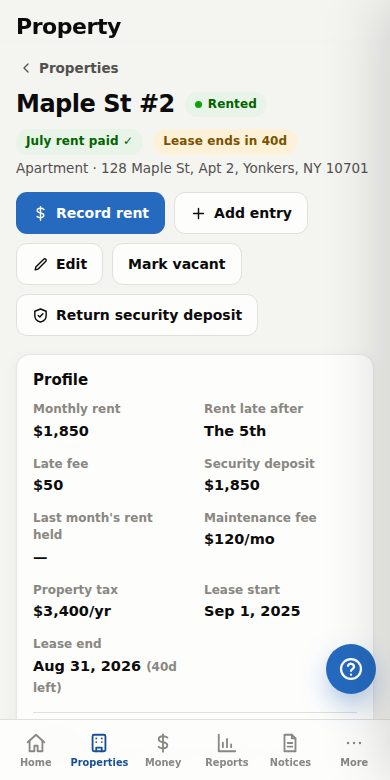
Property page on a phone
Dashboard on a phone

In your pocket at the property

The whole system reshapes itself for your phone — snap a photo of a receipt and attach it on the spot, record rent the moment it arrives, look up a tenant's number from the driveway. Add it to your home screen and it opens like an app.

Log in on any device

See it live, or just say hello

Simple UI, friendly to use — most landlords are up and going in one sitting. Want a walkthrough first? We'll show you around on Zoom.

Schedule a live Zoom demo

Pick a day that suits you — we'll confirm by email with your Zoom link and walk you through the whole system in about 15 minutes.

We'll reply with your Zoom link — usually the same day.

Contact us

Questions about the system? Send a note — it goes straight to our inbox.

Replies come from 1690 Management LLC.

Private by design

This isn't a service that mines your data. It's your system.

Your own login

Email and password, checked by a secure authentication service. Every account's records are sealed off from every other — the database itself enforces it.

Your own cloud

Records live in a private cloud database with row-level security; documents in private storage only your login can reach.

Your own backups

Download a complete snapshot of everything — properties, tenants, ledger, documents — anytime, in one tap.

Try it yourself — free, with sample data

Create a 30-day trial account in thirty seconds and explore a realistic sample portfolio — for testing only, in your own private sandbox. Nothing shared, no credit card.

Start your free trial
Already set up? Log in →  ·  Or schedule a live Zoom demo →

Questions landlords ask us

Straight answers, before you even have to ask.

Is my data private?
Yes — and not as a slogan. Your records live in a private cloud database with row-level security, which means the database itself refuses to show your rows to any login but yours (and any team member you explicitly invite). We don't sell data, run ads, or use tracking. Full details in our Privacy Policy.
What happens when my 30-day trial ends?
Your account locks, but nothing is deleted — every property, entry and document stays saved exactly as you left it. Reach out through the contact form and we'll set you up with a full account; you'll pick up right where you stopped.
What does it cost after the trial?
The 30-day trial is completely free — no credit card, sample data included. When it ends, contact us and we'll set you up with a plan that fits your portfolio, whether that's two doors or twenty.
Can my CPA or property manager have a login?
Yes. Create a one-time invite code in Settings — view-only for your CPA (they can browse everything and download every Excel report, but change nothing) or manager for full access. Remove anyone's access in one tap.
Do my tenants get their own login?
Yes — the tenant portal. You set each tenant's email and passcode from their property page (no account signup for them), and they get their own page: rent shown paid, due or late, a printable receipt for every payment, the lease and documents you choose to share, the deposit you hold, exactly how to pay, and repair requests with photos that land on your dashboard. They see only their own home — never your numbers, never other properties. Lost passcode? They tap "Forgot your passcode?" and you set a new one in one tap.
Can tenants pay rent through the portal?
Yes — including autopay. Tap Set up payments once in Settings and fill one secure Stripe form — who you are plus the bank account the rent lands in, about 15 minutes — and every tenant portal gets a Pay rent button plus Turn on autopay — one tap and the rent charges itself on the lease's due day, every month. Both always charge the exact rent you set — tenants can never type their own amount — the money goes straight into your bank account, and the rent entry is recorded in your books automatically the moment the money actually arrives (cards instantly, bank transfers in a few business days). A tenant can't pay the same month twice, and the same payment can never record twice. Nothing monthly; Stripe's fee per bank transfer is 0.8% capped at $5. Prefer Zelle or checks? The portal keeps showing your payment instructions too.
Can I run credit & background checks on applicants?
Yes. The Screen tenants tool sends each adult applicant an email invitation to apply through TransUnion SmartMove — credit, criminal and eviction reports. You choose the report package; the applicant pays the fee themselves and the finished report is delivered to you. Works for multiple applicants at once, and every invitation is recorded under the property.
Does it handle Airbnb and short-term rentals?
Fully. Flip any property to short-term mode and you get booking logs with nights, occupancy and average-per-night stats, channel tracking (Airbnb, VRBO, or direct), and a month-by-month report of the sales tax you owe on direct bookings — ready for filing.
Are the notices legally valid?
The eighteen templates follow Florida's standard forms — including the security-deposit claim letter with the exact wording the statute requires — and each one explains its rule in plain English. They're serious tools, but service rules are strict: we always recommend a quick check with your attorney before serving anything contested.
Do I need to install anything?
No. It runs in the browser on any computer, tablet or phone — one login, everything synced. On a phone you can "Add to Home Screen" and it behaves like an app.
Can I get my data out?
Anytime, in one tap: Settings → Download backup gives you a complete file of everything, and every report — P&Ls, ledgers, investor statements, the CPA tax package — exports to real Excel. Your records are never held hostage.
What if I get stuck?
The blue ? button inside the app answers questions in plain words ("how do I claim a deposit?") with step-by-step guides — and a guided welcome tour shows new users around. Humans are one contact-form message away.